Mobile Slot Design: How to Create a Better Experience for Smartphone Players
Introduction
Mobile slot design has become a major part of modern online casino development. Players increasingly expect slot games to work smoothly on smartphones and tablets, whether they are spinning during a short break or settling in for a longer session. Simply shrinking a desktop slot onto a smaller screen isn’t enough. Developers need to consider navigation, touchscreen controls, loading speed, readability, graphics, and even how someone naturally holds a phone.
A well-designed mobile slot balances visual entertainment with practical usability. Animations may look impressive, but they shouldn’t make buttons difficult to find or slow the game down. Likewise, a minimalist interface can improve usability without making the experience feel dull. Understanding these trade-offs helps developers create mobile slots that feel intuitive rather than cramped. Below, we’ll explore the core principles behind effective mobile slot design and the details that can make a surprisingly big difference.
Key Takeaways
- Mobile-first design should prioritize smartphone usability instead of simply adapting desktop interfaces.
- Touch controls need large, clearly separated buttons that are comfortable to use.
- Performance optimization can reduce loading times and maintain smoother animations across different devices.
- Responsive layouts allow slot interfaces to adjust effectively to varying screen sizes and orientations.
- Visual hierarchy helps players quickly understand reels, controls, balances, and game information.
- Accessibility can make mobile slots easier to understand and operate for a broader audience.
- Testing across real devices is essential because mobile performance can vary considerably.
What Is Mobile Slot Design?
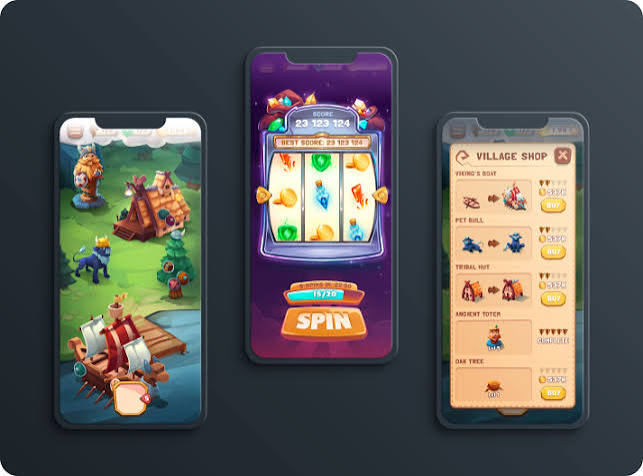
Mobile slot design is the process of creating or adapting digital slot games specifically for smartphones and tablets. It covers far more than graphical appearance. Designers must think about the user interface (UI), user experience (UX), touchscreen interaction, responsive layouts, performance, audio, animation, accessibility, and device compatibility.
The objective is to make important game functions easy to identify and operate on a relatively small display. Players should be able to understand what’s happening without constantly zooming, scrolling, or searching through menus.
Modern development commonly relies on technologies such as HTML5, which allows browser-based games to function across multiple operating systems without requiring older technologies such as Flash. However, technology alone doesn’t guarantee good design. A technically functional slot can still provide a poor experience if controls are tiny, text is unreadable, or animations overwhelm the screen.
Core Principles of Effective Mobile Slot Design
Successful mobile slot design starts with the limitations—and advantages—of the device itself. Smartphones offer less display space than desktop monitors, but touchscreens also provide a direct, intuitive form of interaction.
Designers therefore need to prioritize information. The reels naturally receive the most visual attention, while essential controls should remain accessible without competing excessively with the game artwork. Secondary settings can usually sit inside menus or expandable panels.
Consistency matters too. If buttons change position unexpectedly or similar icons perform different actions, the interface quickly becomes confusing. Familiar interaction patterns reduce the amount of learning required.
A practical hierarchy often looks something like this:
| Element | Design Priority | Main Consideration |
|---|---|---|
| Reels | Very high | Visibility and clarity |
| Spin control | Very high | Easy touchscreen access |
| Balance/bet display | High | Readable information |
| Game information | High | Clear access |
| Settings | Medium | Accessible without clutter |
| Decorative effects | Lower | Shouldn’t obstruct gameplay |
Responsive Layouts for Different Screen Sizes
One of the biggest challenges in mobile slot design is the sheer variety of devices. A game might be opened on a compact smartphone, a large flagship phone, a foldable device, or a tablet. Designing around one fixed resolution is therefore risky.
Responsive design allows interface elements to adjust according to available screen dimensions. Reels may scale proportionally, menus can reposition themselves, and controls can change spacing without losing their relationship to the central game area.
Orientation also deserves attention. Some slots work primarily in portrait mode, while others make better use of landscape orientation. Portrait layouts are convenient for one-handed smartphone use, whereas landscape can provide additional horizontal space for wide reel configurations.
Designers should also account for modern hardware features such as rounded corners, camera cutouts, and screen notches. Important controls shouldn’t disappear beneath these areas.
Responsive testing is ultimately about ensuring that the same game remains understandable and comfortable across different screens—not making every version look pixel-for-pixel identical.
Designing Touch-Friendly Slot Controls
Desktop interfaces rely heavily on a mouse pointer, but mobile players interact with the screen using fingers. That sounds obvious, yet it changes a surprising number of design decisions.
Touch targets should be sufficiently large and separated so users don’t accidentally activate neighboring controls. The primary spin button typically deserves prominent placement because it’s one of the interface’s most frequently used elements. Bet controls, menus, sound settings, and information buttons should also be visually distinct.
Designers should consider thumb reach. On larger phones, controls positioned in difficult corners can require awkward hand movement. Frequently used functions are generally more comfortable when placed within natural thumb zones.
Good touch design also provides feedback. A button might visually respond when pressed, for example, helping the user understand that the input has registered.
At the same time, designers should be careful with gestures. Swiping and dragging can feel natural, but hiding essential functions behind unfamiliar gestures creates unnecessary confusion. Straightforward usually beats clever here.
Performance and Loading Speed
Mobile slot games often contain detailed artwork, sound effects, music, animations, and multiple interactive features. Those assets can become demanding, particularly on older phones or slower network connections.
Performance optimization aims to deliver attractive visuals without making users wait unnecessarily. Developers can compress image assets, optimize audio files, reuse graphical resources, and load non-essential content only when it’s needed. This process is sometimes called lazy loading.
Frame-rate stability is another important consideration. Choppy reel animations or delayed touch responses can make an otherwise polished game feel unfinished. Performance testing should therefore include lower-powered devices rather than focusing exclusively on premium smartphones.
Network conditions matter as well. Mobile users may switch between Wi-Fi and cellular connections, so games need to handle interruptions gracefully where technically possible.
Optimization is essentially a balancing act: visual richness matters, but adding another giant animation isn’t much of a win if it turns the loading screen into the game’s longest feature.
Visual Design and Readability
A mobile slot needs personality, but its theme shouldn’t overpower usability. Detailed backgrounds, animated characters, particle effects, and elaborate symbols can build atmosphere, yet excessive visual noise makes essential information harder to process.
Contrast is particularly important on small screens. Text, values, and buttons should remain distinguishable from their backgrounds. Font sizes need to be readable without requiring zooming, including within menus and informational screens.
Designers can use visual hierarchy to guide attention. Size, color, spacing, and motion help communicate which elements are interactive and which are decorative.
Animation should have a purpose too. It can communicate outcomes, highlight features, or strengthen a game’s theme. Constant movement everywhere, however, can distract from the reels and controls.
Developers should also remember that smartphones are used under wildly different lighting conditions. A screen that looks perfect in a dim design studio may become difficult to read outdoors, so contrast testing is well worth the effort.
Accessibility in Mobile Slot Interfaces
Accessibility is increasingly important in digital product design, and mobile slots are no exception. An accessible interface considers players who may experience visual, motor, auditory, or cognitive limitations.
Color shouldn’t be the only method used to communicate important information. Designers can combine color with text, symbols, shapes, or other indicators. Strong contrast and legible typography can also improve readability for everyone, not just users with specific accessibility requirements.
Audio presents another consideration. Important information should not depend exclusively on sound because users may have hearing impairments—or simply keep their phone muted. Clear visual feedback can complement audio cues.
Menus should use understandable labels, while important game information, rules, and controls should be straightforward to locate. Accessibility features may also need to account for operating-system settings and assistive technologies, depending on the platform and implementation.
Ultimately, accessible design and good UX often overlap. Making an interface clearer, simpler, and more predictable generally benefits a much wider range of users.
Testing Mobile Slot Designs
Testing is where assumptions meet actual devices. A design that looks excellent inside a desktop prototype can behave very differently once it’s running on a smartphone.
Teams should test multiple screen sizes, operating systems, browsers, and hardware performance levels. Real-device testing is especially valuable because emulators cannot reproduce every hardware or interaction quirk.
Testing should examine:
- Button size and placement
- Portrait and landscape layouts
- Loading performance
- Animation smoothness
- Text readability
- Audio behavior
- Menu navigation
- Interruptions and connectivity changes
- Different screen aspect ratios
- Accessibility considerations
Usability testing with actual users can reveal issues developers may overlook. For example, testers might repeatedly tap the wrong control or struggle to locate game information. Those patterns provide useful evidence for redesign.
Quality assurance should also continue after release. Operating-system updates, new browsers, and emerging device formats can introduce problems into software that previously worked perfectly.
Common Mobile Slot Design Mistakes
One common mistake is treating mobile as a reduced desktop experience. Shrinking every interface component might technically fit everything onto the screen, but the result can be frustrating to operate.
Another problem is excessive interface clutter. Designers sometimes attempt to display every available setting, indicator, promotion, and feature simultaneously. Small screens punish this approach quickly.
Other mistakes include tiny text, controls placed too close together, long initial loading times, low-contrast menus, and oversized animations that obscure important information.
Developers should also avoid relying exclusively on powerful devices during testing. A game that performs beautifully on the latest premium phone might struggle considerably on mid-range hardware.
Finally, novelty shouldn’t come at the expense of clarity. Experimental controls and unusual navigation can differentiate a product, but players still need to understand the interface. Good mobile design makes important actions obvious while allowing the game’s visual identity to provide the distinctive character.
Conclusion
Mobile slot design combines responsive development, touchscreen usability, visual communication, performance optimization, and accessibility. The strongest designs don’t simply squeeze desktop games onto smaller displays. Instead, they consider how people actually interact with smartphones and organize the experience around those behaviors. Clear controls, readable information, stable performance, and adaptable layouts provide a strong foundation.
For developers and designers, the best approach is to treat mobile usability as a core requirement from the beginning rather than a final adjustment. Test across different devices, simplify where complexity adds little value, and make every major interface element earn its screen space. A mobile slot can still be visually ambitious and feature-rich, but the experience works best when presentation supports usability rather than fighting it.
FAQs
Should mobile slots be designed in portrait or landscape mode?
There is no universal best orientation. Portrait mode can support convenient one-handed use, while landscape provides more horizontal space for reels and interface elements. The right choice depends on the reel configuration, visual concept, controls, and overall user experience.
How does battery consumption affect mobile slot design?
Heavy animations, constant graphical effects, audio processing, and intensive rendering can increase battery and processor usage. Developers can optimize assets and animation systems to reduce unnecessary resource consumption while preserving the visual quality of the game.
Should mobile slot games support tablets separately?
Tablet users benefit from layouts that take advantage of additional screen space rather than simply enlarging a smartphone interface. Responsive breakpoints can reorganize controls, menus, and visual elements to produce a more natural tablet experience.
What role does haptic feedback play in mobile slot interfaces?
Haptic feedback can provide a subtle physical response to touchscreen interactions. When implemented carefully, it can reinforce button presses or interface events. It should remain optional, however, since user preferences and device capabilities differ.
How often should a mobile slot interface be updated?
There is no fixed schedule. Teams should monitor device changes, operating-system updates, browser compatibility, accessibility expectations, and usability feedback. Interface updates are most useful when they solve measurable problems rather than changing familiar controls purely for visual novelty.