Instagram to MP4: How to Download Instagram Videos, Reels & Stories
Saving public Instagram content for offline viewing can be useful when you want to keep a personal reference, back up your own posts, or watch a video later without returning to Instagram. Converting Instagram to MP4 gives you a widely supported video file that can be played on phones, computers, tablets, and other compatible devices.
“Instagram to MP4” simply means saving a publicly accessible Instagram video, Reel, or video Story as an MP4 file on your device. For creators, social media managers, and casual users, a browser-based downloader can process a public Instagram link and provide the available video without requiring additional software.
Grabfy offers this workflow through a web browser and is designed for supported publicly accessible Instagram content.
How to Convert Instagram to MP4
Converting an Instagram video to MP4 generally takes three steps: copy the Instagram link, paste it into the downloader, and save the available file.
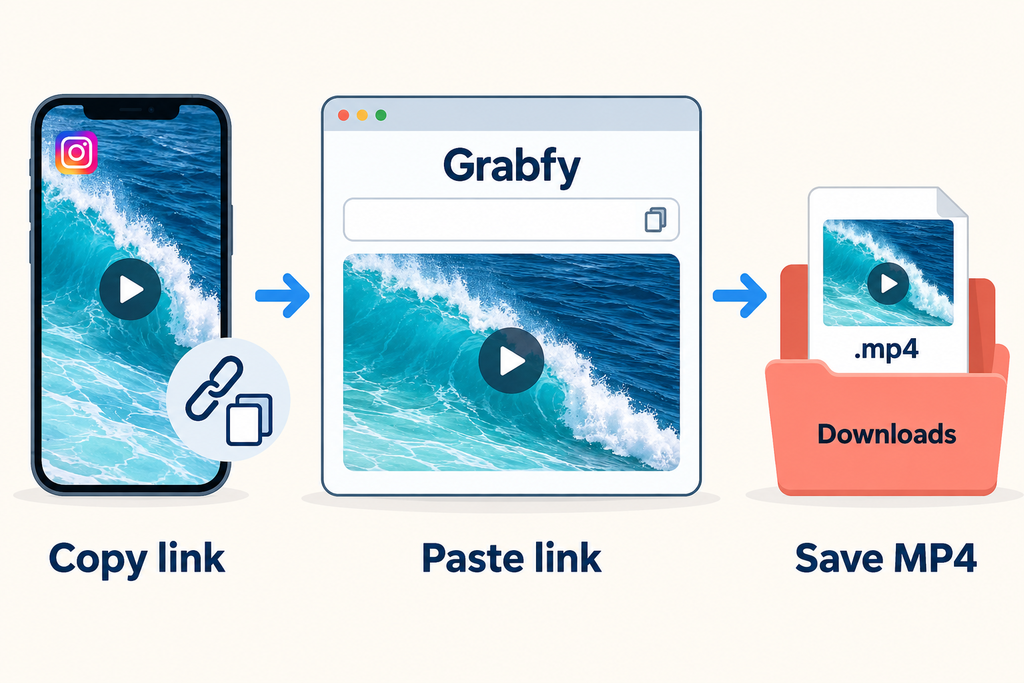
Step 1: Copy the Instagram Video URL
Open Instagram in the app or a web browser and find the video you want to save. This could be a public Reel, video post, Story, Highlight, or other supported content.
Use Instagram’s sharing options to copy the video URL. On desktop, you may also be able to copy the URL from the browser address bar. The content needs to be publicly accessible for a public-link downloader to retrieve it.
Step 2: Paste the Link Into Grabfy
Open Grabfy.com in your browser and paste the Instagram video link into the appropriate input field. Grabfy provides an Instagram-focused workflow for processing supported public media without requiring users to install a separate downloader application.
Because the service works through a browser, the same basic process can be used across mobile and desktop devices. This makes it particularly practical for users who work with different supported Instagram formats and want one central browser-based service.
Step 3: Save the Available MP4 File
Once the public link has been processed, select the available download option to save the file. The exact destination depends on your browser and device settings. It may appear in your Downloads folder or another configured location.
The quality of the saved video depends on the version Instagram makes available. If an HD version is accessible, the downloaded file may also be available in HD. A downloader cannot create visual detail that is missing from the source.
Download Instagram Videos as MP4
Regular Instagram posts can contain square, portrait, or landscape videos, while carousel posts may combine multiple photos and videos. Saving supported Instagram videos as MP4 keeps them in a widely compatible format that is easy to store and play.
You may want to download one of your own published videos as a backup, keep an approved tutorial for offline reference, or retain authorized campaign material for later review. Supported carousel posts may also contain individual videos that can be saved separately.
“Original quality” should not be interpreted as the untouched file from the creator’s camera. Instagram processes uploaded media, so a downloader can only retrieve a version Instagram makes accessible.
Convert Instagram Reels to MP4
Reels are another common type of Instagram video that users may want to keep for offline viewing. If a Reel is publicly accessible, its link can be processed with a compatible downloader and the available video saved to a device.
The workflow remains straightforward: open the public Reel, copy its link, paste the URL into the downloader, process it, and save the available video.
For people who regularly work with Reels and other supported Instagram formats, Grabfy provides a convenient central platform instead of requiring a different tool for each type of content. Its browser-based approach is useful for personal backups, permitted offline references, and organizing your own published Instagram media.
Instagram also provides native downloading for some public Reels when creator settings and available features permit it. Regardless of the method used, downloading a Reel does not transfer ownership or reuse rights.
Download Instagram Stories as MP4
Instagram Stories are temporary by design. An active Story normally remains visible for 24 hours unless the account owner adds it to a Highlight or otherwise retains it through Instagram’s features.
For supported public Story videos or Highlights, users can copy the available link and process it while the content remains accessible. Video Stories can be saved as video files, while photo Stories should remain images rather than being unnecessarily converted into video.
Private Stories, Close Friends content, and other restricted media should not be treated as publicly downloadable content.
What Video Quality Can You Expect?
One of the most common questions about Instagram to MP4 tools concerns video quality. The practical answer is that the final download depends on the media Instagram makes available.
If the accessible source is HD, the downloaded file may also be available in HD. If Instagram provides only a lower-resolution version, an online downloader cannot restore missing detail.
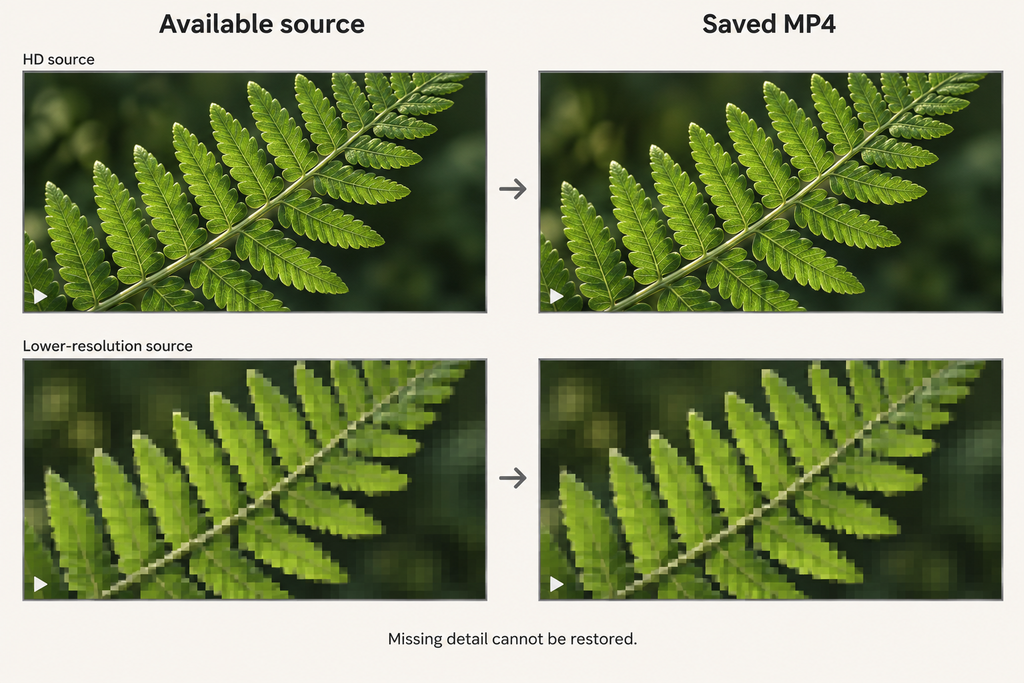
Claims of guaranteed 4K conversion or improved quality should therefore be treated carefully. Simply increasing the dimensions of lower-resolution footage does not add genuine visual detail. The same principle applies to audio quality and compression.
Why MP4 Is Useful for Instagram Videos
MP4 is widely supported across modern devices, operating systems, media players, and editing applications. This broad compatibility is one reason it is commonly used for downloaded web video.
An MP4 file can generally be stored on a phone, transferred to a computer, added to personal storage, or opened in compatible editing software. It is also useful for offline viewing because you do not need to reload the Instagram post every time you want to watch a video you are permitted to save.
Browser-Based Downloading vs. Installing an App
A browser-based Instagram downloader has a practical advantage because there is nothing extra to install. You open the service, submit a supported public link, and process the available media.
This approach can be convenient for occasional downloads and reduces the need to grant unrelated app permissions. A service intended to process publicly accessible Instagram links should not need your Instagram password simply to handle a public URL.
Be cautious with third-party services that request account credentials, authentication codes, or permissions that do not appear necessary for processing public media.
Can You Download Instagram Videos Without Logging In?
A browser-based downloader may process supported public links without requiring you to provide Instagram login credentials to the downloader. The key limitation is public accessibility.
Private-profile content is different. Public-link downloaders should not be expected to bypass access restrictions. For your own Instagram content, Instagram’s built-in saving options or account data tools may also be appropriate when creating a personal archive. Responsible Use of Downloaded Instagram Content
The technical ability to download a public video does not automatically provide permission to reuse it. Keeping content for personal reference is different from republishing another creator’s work.
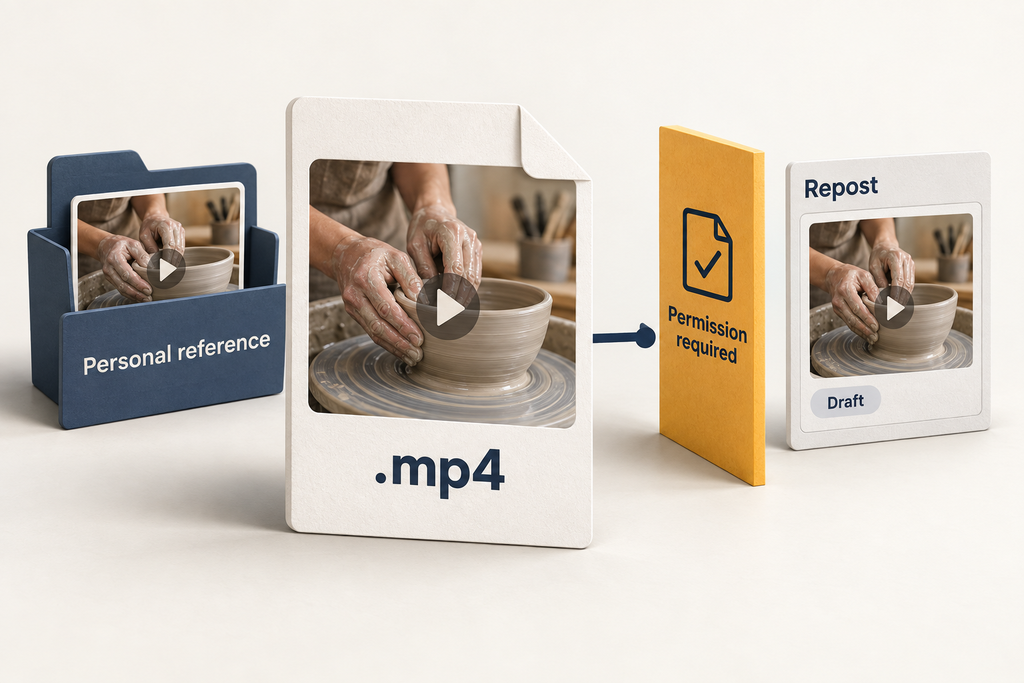
Crediting the original creator does not necessarily replace permission. Before reposting, modifying, distributing, or commercially using downloaded content, consider whether you have the necessary rights or authorization.
Instagram to MP4 FAQ
Can I download an Instagram video as MP4?
Supported publicly accessible Instagram videos can be processed by compatible download tools and saved using the available download options.
Can I save Instagram Reels as MP4?
Public Reels may be downloadable through Instagram’s native feature when available or through a compatible browser-based downloader.
Can Instagram Stories be downloaded?
Supported public video Stories and Highlights may be saved while they remain accessible. Instagram also provides built-in options for creators to save and archive their own Stories.
Can an Instagram downloader improve video quality?
A downloader cannot recreate visual detail absent from the available source. Maximum useful quality depends on the version Instagram provides.
Can I download videos from private Instagram accounts?
Public-link downloaders are intended for publicly accessible media and should not be used to bypass private-account restrictions.
A Simple Way to Save Public Instagram Videos
Converting Instagram to MP4 is straightforward when content is publicly accessible. Copy the Instagram link, process it through a compatible browser-based downloader, and save the available video file to your device.
Grabfy is particularly useful for this workflow because it brings support for multiple types of public Instagram media into one browser-based service. Whatever method you use, remember that download quality depends on the source Instagram provides and that downloading content does not automatically grant permission to reuse it.